
The [listevents] shortcode puts the next few events on any page as small cards: a calendar block with the day and date, the event’s title linked to its page, its start time, and if you ask for it the venue and online meeting link. Use it on a team page for that team’s events, on a landing page for one type of event, or in the sidebar. It needs the Events module, switched on under Options, Modules.
Add the listevents shortcode
In the editor toolbar select the shortcode button, choose List events, fill in the boxes and select Insert. Or type it:
[listevents num="4" cat="training" location="on"]
Attributes of listevents
num
The most events to show. The default is 3.
cat
Optional. The slug of one event type, as shown under Events, Event types. Only events of that type are listed.
tag
Optional. A tag slug. Only events carrying that tag are listed. Combine it with cat to narrow further.
location
Set to on to show each event’s location, and a link to its online meeting where one is set. Left out, the cards show the date, title and time only.
css_col
Optional. A class name added to every card, for a site that colours event cards per team through the customiser’s Additional CSS. Most sites do not need it.
What listevents shows
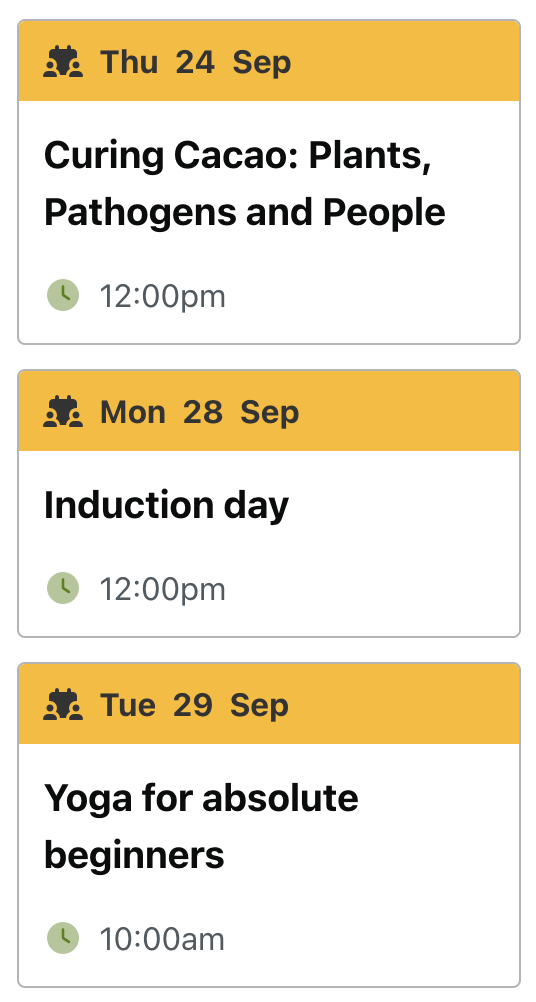
Upcoming events only, soonest first. An event counts as upcoming until the end of its last day, or until its end time on that day if one is set, so an event running this afternoon is still listed this morning. Past events never appear. Each card shows a calendar icon with the day, date and month of the start, the title linked to the event page, and the start time if the event has one. There is no link to the events page after the list; add one yourself if the page needs it.
When nothing is coming up that matches, the shortcode prints nothing at all, so the page does not show an empty box.
Examples of listevents
The next three events of any kind:
[listevents]
The next six staff network events with their venues:
[listevents num="6" cat="staff-network-events" location="on"]
The next two events tagged with a team’s tag, for that team’s page:
[listevents num="2" tag="finance" css_col="finance-pink"]
Related
- (Govintra) Events widget: the same idea in a widget area, with more options.
- Display a list of posts: a plain linked list of upcoming events, without the calendar cards.
- Events template: the full events page with list, week and month views.
- Add or edit an event: the fields the cards read.