
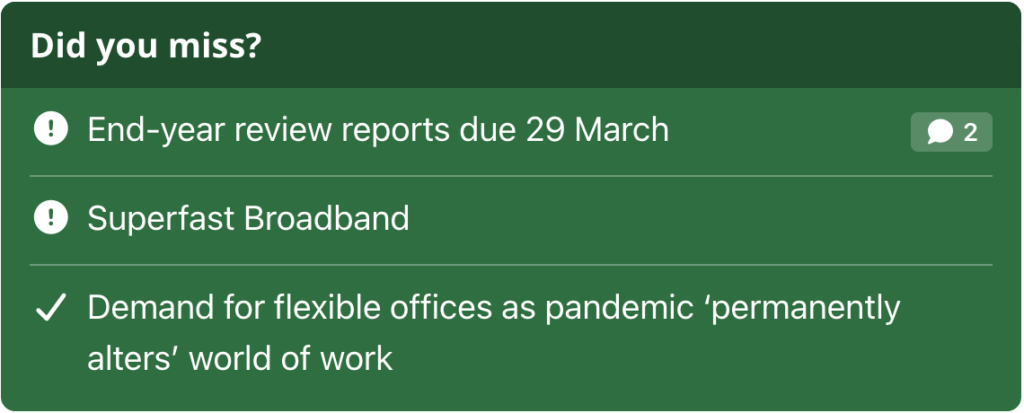
The (Govintra) Need to know widget is a coloured box that lists news stories marked as need to know, so urgent notices stand out from the rest of the news. It is usually the first widget in the first homepage column. Go to Appearance, then Widgets, and add (Govintra) Need to know to a widget area. It needs the News module to be on under Options, Modules.
Mark a story as need to know
Edit the news story and, in the Format box in the right-hand column, choose Status. Only stories with the Status format are listed by the widget, newest first. To take a story out of the widget later, set the format back to Standard, or use the story’s News expiry box with the action Change to regular news so it happens on a date and time you choose. See Add or edit a news story.
Widget settings
Title
The heading inside the coloured box. The default is “Need to know”.
Number of items
How many stories to list, newest first. The default is 3.
Colour scheme
The background of the box: Red (the default), Yellow, Amber, Blue or Green. The text and icons are white or dark to suit. Red says “urgent”; amber or blue suit a standing reminder.
Hide items already read (cookie-based)
Off by default. When on, a story disappears from the widget once the person has read it, and when every listed story has been read the whole widget disappears from the page. When off, a read story stays in the list with a tick in place of the icon.
How the widget knows a story has been read
Selecting a story in the widget, or opening the story any other way, sets a cookie in that browser for 30 days. The cookie is per story and per browser, so the same person sees the story again on another device, and a story marked as read reappears after 30 days if it is still need to know. There is no record of who has read what.
The icon
Each item has an icon before its title. It is set once for the whole intranet under Options, Modules, on the News tab, as Need to know icon: a Font Awesome icon name without the fa- prefix, such as circle-exclamation, triangle-exclamation or bullhorn. The default is flag. The icon is always drawn in the solid style so it shows clearly on the coloured background. See Module settings and options.
Which stories appear
- Published news stories with the Status format only, newest first, up to the number of items. Drafts and scheduled stories are not shown.
- Each item shows a comment count if it has comments, and a like count if likes are on.
- If there are no Status stories, the widget is left out of the page altogether.
- A Status story is still a news story: it also appears in the News widget and on the News page. Mark a story as need to know for its urgency, not to keep it out of the news.
- On the Aggregator page template, a news listing block can be set to show only need-to-know stories or to exclude them.